
Southern Machinery
Southern Machinery
SMT & THT PCB Assembly Automation for EMS Factories
Use of PCB Pallets in Wave Soldering
Patch components are used more and more on the circuit board, but there are still some perforated components between them. For this kind of board, selective soldering is the best solution, but not every company has enough funds to purchase selective soldering equipment, or the number of this type of circuit board is too small, specifically to buy selective soldering equipment is not Cost-effective. Manual welding is prohibited in certain industries such as the automotive industry
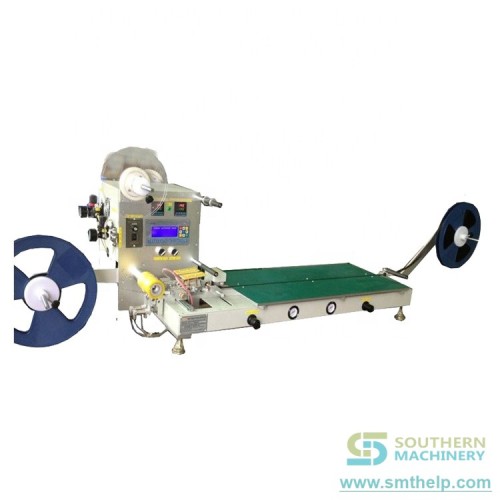
Therefore, in PCB wave soldering, using trays to block those patch components is a good method: reliable, fast production, and adaptability to high-capacity requirements.
www.smthelp.com

The benefits of using trays:
Lead-free soldering requires higher soldering temperatures. Therefore, the circuit board is more easily bent during welding. The tray provides maximum protection of the circuit board during soldering and prevents bending.
Similarly, in the automotive and consumer electronics industries, many special-shaped circuit boards have emerged for the needs of applications. It is sometimes difficult to transport these shaped plates with conventional chain rails and mesh belts, and placing the circuit board plates in trays allows any type of circuit board to be shipped.

By soldering some of the bottom components through the tray, it is also possible to use PCB wave soldering equipment for selective soldering of the product.
Since most trays are thick (sometimes 15 mm), solder certainly does not flow to the top of the board. The oxide layer on the solder surface will also be washed away by the edge of the tray before the board reaches the peak, so that when the solder starts, the tin is relatively clean.
By adding some stiffening strips to the tray, it can increase its hardness to withstand high-strength welding. It is also possible to install heat-absorbing blocks, component fixing devices and some other auxiliary devices on the upper part.
The use of pallets also helps standardize the width of the product line, soldering different circuit boards on the same production line, and can use bar code readers and other identification tools to quickly change process programs for different boards.
Although there are many advantages to using trays in lead-free soldering, it can also cause solder balls.
Requirements for pallet materials:
In order to maximize the service life of the trays, the trays must be made of materials that can withstand high temperatures and harsh process conditions, especially for lead-free soldering.
www.smthelp.com

To meet these requirements, the material used to make the tray must meet the following characteristics:
• High dimensional stability
• Good thermal shock resistance
• Can remain flat after repeated use
• Corrosion resistance (flux and cleaning agent)
• Does not absorb moisture
The use of the tray brings the process problems:
The flux system must be able to spray the circuit board completely with flux. Poor tray designs can lead to “shadow effects” in flux spraying: Some parts of the board have insufficient flux or no flux at all. The flux must be sprayed onto the board and spread through the capillary action.
Before the tray touches the crest, it must be heated in the preheating unit. A typical preheating configuration is a combination of heat pipes and hot air forced convection. If the temperature drops before contact with the peak, the tray will have an endothermic effect, making the welding process difficult to control.
The use of trays requires a wave height of up to 0.5 inches (12.5 mm). In the case of such a high pump speed, the use of nitrogen can help reduce dross. When using pallets in lead-free soldering, Vitronics Soltec’s perturbed “smart wave” can also promote tinning of the perforated component.
In addition, we must pay special attention to keeping the circuit board in the pallet flat. If there is a gap between the circuit board and the tray, the flux will flow into the gap, and the solder will flow to the board when passing through the peak. This will cause solder residue on the board.

The gap between the circuit board and the tray may cause solder residue on the circuit board
Circuit board and tray design recommendations:
Avoid placing larger components near the piercing element as this can cause shadowing effects and tin difficulties.
Leave proper clearance around the pins and edges of the through-hole components so that solder can flow. These tin guides will guide the solder to the seat of the tray opening, while also greatly improving the solder flowability.
www.smthelp.com

The tin slot at the tail of the tray allows the solder to flow smoothly back to the tin tank
The opening of the tray should be as large as possible to facilitate the flow of solder. This will reduce some of the welding defects, such as: short circuit and solder balls. At the same time, it is also beneficial to the solder filling of the through hole, because the large opening also means that there is more energy to enter the welding area.
Prepared by :ming@smthelp.com
Wave solder welding in SMT assembly process

The SMT assembly process is closely related to each process before welding, including capital input, PCB design, component weldability, assembly operation, flux selection, temperature / time control, solder and crystal structure, etc.
At present, the most commonly used solder for wave soldering is eutectic tin lead alloy: tin 63% and lead 37%. The temperature of solder in the soldering pot should be mastered at all times. The temperature should be higher than the temperature of the alloy at 183 C, and the temperature is uniform. In the past, the temperature of soldering pot at 250 degrees was regarded as “standard“.
With the innovation of flux technology, the uniformity of the solder temperature in the whole solder pot is controlled and the preheater is added. The development trend is to use the solder pot with low temperature. It is common to set solder pot temperature at 230-240 degrees Celsius. Usually, the components do not have uniform thermal quality. It is necessary to ensure that all solder joints reach enough temperature to form qualified solder joints. The important problem is to provide enough heat to raise the temperature of all leads and pads, thus ensuring fluidity of solder and wetting both sides of solder joints. The low temperature of the solder will reduce the thermal shock to the component and the substrate, and help to reduce the formation of the slag. Under the lower strength, the flux coating operation and the flux compound can make the peak of the wave with sufficient flux, thus reducing the burr and welding ball. The solder composition in the solder pot is closely related to the time, which changes with time, which leads to the formation of the scum, which is the reason for the removal of residual and other metal impurities from the welded components and the loss of tin in the welding process.
These factors can reduce the fluidity of the solder. The maximum limit of tin content in metal scum and solder should be specified in the procurement. In the welding process, the requirements for the purity of solder are also specified in the ANSI/J-STD-001B standard. In addition to the limitation of scum, the minimum content of tin in 63% tin and 37% lead alloys should be no less than 61.5%. The concentration of gold and organic swimming layer on the wave soldering assembly is faster than in the past. This aggregation, combined with obvious tin loss, can cause solder loss of fluidity and produce welding problems. Rough and granular solder joints are often caused by scum in solder. Because of the concentrated pomum in the solder pot or the innate and coarse grainy welding spot of the component itself, it may also be a sign of low tin content, not a local special solder, or the result of tin loss in the tin pot. This appearance may also be caused by vibration or shock during solidification.
The appearance of solder joints can directly reflect technological problems or material problems. In order to maintain the “full pot” state of the solder and to analyze the solder pot according to the process control plan, it is very important to analyze the solder pot. The flux in the soldering pan is usually not necessary because of the dross in the soldering pan, which is usually unnecessary, because the solder in the tin pot is required in the conventional application to make the solder in the tin pan always full. In the case of loss of tin, the addition of pure tin helps to maintain the desired concentration. In order to monitor the compounds in tin pot, routine analysis should be carried out. If tin is added, sampling and analysis should be taken to ensure the correct proportions of solder components. Too much scum is a tricky problem. There is no doubt that there are always scum in the tin pot, especially when welding in the atmosphere. The use of “chip wave peak” is very helpful for high density welded components. Because the surface of the material exposed to the atmosphere is too large to oxidize the solder, more dross will be produced. The solder is covered with a scum layer and the oxidation rate slows down. In welding, more turbulence will occur due to the turbulence and flow of the crest in the tin pot. The recommended method is to skim the scum. If skipping regularly, more scum will be generated and more solder will be consumed. Scum may also be involved in the wave crest, causing the instability or turbulence of the crest. Therefore, it is necessary to give more maintenance to the liquid components in the tin pot. If the amount of solder in the tin pot is allowed to reduce, the scum on the solder will enter the pump, which is likely to happen. Sometimes, granular solder joints are mixed with scum. The scum found initially may be caused by rough crest and may block the pump. Tin pots shall be equipped with adjustable low capacity solder sensors and alarm devices.
Wave solder welding in SMT assembly process
Crest is the core of wave crest in wave soldering process. The most critical step is to bring the preheated, coated, and non – dirt metal through the conveyor belt to the welding workstation, contact the solder with a certain temperature, and then heat it, so that the flux will produce chemical reactions, and the solder alloy forms interconnect through the wave peak power. At present, the commonly used symmetrical peak is called the main wave peak, which sets the pump speed, wave peak height, depth of infiltration, transmission angle and transmission speed, so as to provide a full range of conditions to achieve good welding characteristics. The data should be adjusted properly, and the solder should be slowed down and slowly stopped after leaving the crest. PCB with the wave crest running, the solder will be pushed to the outlet. In the most reliable case, the surface tension of solder and the optimal crest operation of the plate can achieve zero relative motion between the components and the crest of the outlet. This shelling area is achieved by removing solder from the plate. Sufficient inclination angle should be provided to avoid defects such as bridge, burr, wire drawing and solder ball. Sometimes, the outlet of the crest needs hot air flow to ensure that possible bridging is eliminated. When the surface mount element is installed at the bottom of the plate, sometimes, the bubbles in the “harsh wave peak” region formed in the back of the flux, and the wave peak is used before the wave peak is leveled. The high vertical velocity of the turbulent crest helps to ensure the contact between the solder and the lead or pad. The vibration part behind the leveling laminar peak can also be used to eliminate bubbles and ensure satisfactory contact components of the solder. The welding workstation should basically achieve: high purity solder (according to standard), wave peak temperature (230~250 degrees C), total time of contact peak (3~5 seconds), depth (50 ~ 80%) of PCB immersed in wave peak (50 ~ 80%), to achieve parallel transmission track and flux content in tin pot in parallel state of wave peak and orbit. Cooling after wave soldering is usually equipped with cooling workstations at the end of the wave soldering machine. It is a trend to restrict the formation of solder joints between copper and tin intermetallic compounds, and the other is to accelerate the cooling of the components, and to avoid the plate displacement when the solder is not fully solidified. The rapid cooling assembly is designed to limit the exposure of sensitive components to high temperatures. However, the danger of corrosive cooling system to thermal shock of components and solder joints should be taken into account. A well controlled “soft, stable” and forced gas cooling system should not damage most components. There are two reasons for using this system: it can process the board quickly without hand holding, and ensures that the temperature of the component is lower than that of the cleaning solution. People are concerned about the latter reason, which may be responsible for the foaming of some flux residues. Another phenomenon is that sometimes there is a reaction with some flux dross, so that residues can not be washed away. No formula can meet the requirements of all machines, all designs, all materials and technical material conditions and requirements that are guaranteed to meet the data set by the welding workstation. We must understand every step of the whole process. 4 conclusion in conclusion, in order to obtain the best welding quality and meet the needs of the users, every step in the pre welding and welding process must be controlled, because each step of the assembly process of SMT is interrelated and interacted with each other, and any step has the dependability and quality in the whole. Welding operation is also the case, so all parameters, time / temperature, solder volume, flux composition and transmission speed should be strictly controlled. For the defects produced in the welding, the causes should be identified early, and the corresponding measures should be taken to eliminate all the defects that affect the quality in the bud. In this way, the products produced can be guaranteed.
How to prevent static electricity in the process of SMT placement machine?

In the SMT production line, we will encounter the problem of static electricity, from the friction between the clothes and the dry air to the dry air, which is the end of the duckweed. If the condition is suitable, it is a few volts and the peak is hundreds of kilovolts, so anti static is the need to do in our work, today, the south. Give some measures to introduce mechanical anti electrostatic patch SMT.
static clothing, antistatic shoes (conductive hats)
Http://www.smthelp.com
Static electricity has three: static clothing, antistatic shoes (conductive shoes), electrostatic hand rings, antistatic shoes and electrostatic hand rings to guide the human body to avoid accumulation in the human body.
Ordinary clothes will have great electrostatic voltage in the walk (>1000V). And antistatic clothing does not happen when it moves. This is the main role of antistatic clothing, long strip antistatic clothing can not shield the inside of the clothing produced static (after wearing still >1000V), grid – like antistatic clothing can be shielded (<200V), the static electricity generated through the floor and the grounding line of various parts of the plant to the outside of the general grounding wire.
Http://www.smthelp.com
一,The purpose of preventing static electricity
1, strengthen the consciousness of the workers on the anti static operation
2, reduce the poor production caused by static electricity
3, prevent static electricity from causing damage to the product
二,Scope of application: all SMT production lines
三,The reasons
The generation of static electricity is not perceived, but the static electricity produces the voltage of tens of thousands of volts. When the static electricity comes into the tip (the static release point, such as the human finger), it releases all the energy in a moment, causing the contact material to be struck by electric shock, causing the capacitance, IC, line road and so on to be destroyed and burned, so that the product is strict. In the case of heavy damage, static electricity measures should be taken. .
四,The contents of the operation
Anti Static Tools & Supplies
SMT magazine rack&turnover rack
(一)Prevention and treatment of human static electricity
1, the workers should wear electrostatic clothing, work shoes;
2, the operator should take electrostatic gloves when working.
3, the operator should take an electrostatic ring in the operation.
(二)Prevention and control of static electricity
- Make use of electrostatic materials to produce production tools.
2, the storage place to prevent static electricity;
(三)Prevention and control of static electricity of a worktable / mobile vehicle
1, the anti static film should be pasted on the work table.
2, the operation platform / mobile vehicle must have antistatic grounding chain.Prevention of equipment static electricity: good grounding wire
(四)Prevention and control of material static electricity
- When the material is taken, the operator should use the antistatic method: with electrostatic gloves and electrostatic rings.
2, the material storage should be anti static measures: material cabinet to paste electrostatic film, grounding chain.
3, there should be anti-static measures in temporary storage area: installing grounding chain.
(五)Prevention and control of static electricity related to production: anti static measures should be taken when using items related to production: static wires and antistatic films.
五, Note:
- The online operators should strictly abide by this rule
-
The online operators are supervised by the team leader, and the engineers are supervised by the engineers.
|
|
|
|
Troubleshooting E-Stop and Interlock Circuits on the Machine
Instructor Guide
|
|
|
|
|
|
|
|
|
IM8ECTT-IG Rev B |
|
Troubleshooting E-Stop and Interlock Circuits
On the Machine
Estimated Time
|
3 hours |
Prerequisite setups and materials
|
These setups and materials are required before this module is presented:
|
Introduction
|
The E-Stop and interlock circuits on Universal‘s products are designed to ensure that axis operation can occur only when these safety circuits are satisfied. The E-Stop and Interlock safety circuit is hard-wired and will perform its function independent of machine software. In this lesson, you will look at the E-Stop and Interlock safety circuit in detail. Once you understand how it works you will get some practical experiences in troubleshooting this circuit. |
Lesson Objectives
|
Instructional Strategy for the module
|
European Safety Standards
European Safety Standard
|
Universal‘s E-Stop and Interlock circuit is in compliance with European Safety Standards, which include the following requirements:
|
the E-Stop and Interlock Circuits
Introduction
|
This activity is intended to give you some practical experiences in troubleshooting the E-Stop and Interlock Circuits on a machine. In this activity your instructor will put one or more bugs in the machine E-Stop and Interlock circuits. Your job is to find and fix the bugs so that the machine is returned to normal operation. |
CAUTION!
|
*An E-Stop or circuit breaker can often be used to remove assembly power. |
Directions
|
When looking for machine-specific information, always refer to the electrical diagrams that come with the machine on which you are working. |
Simplified Schematic of the Interlock System for Single Head Axial Machines
Simplified Schematic of the Interlock System for 6241FSimplified Schematic of the Interlock System for Dual Head Axial Machines
Simplified Schematic of the Interlock System for 6380A
Trace signals in the electrical schematics to answer the following questions.
5FU-Side (SHT2) This question refers to the drawings for PS1, trace it from the secondary side of 2T (24V SEC) and is tied in with 5FU (sheet 2)
56VDC is supplied to 4TB Connects 56 VDC from secondary of 1T to 4TB distribution point to X-Y table motors.
the “ELECT DIAG, Power chassis” schematic Ask students: You lost 24VAC, where it’s generated from? (the inserter’s power chassis, PS1.) Where do you find that drawing? ELEC DIAG, Power Chassis. |
E-Stop Circuit Active |
Direction
|
Instructor notes: the following table lists suggested bugs to simulate an E-stop and Interlock circuit problem. |
| Problem |
Simulation Method |
| 24VAC to PS is lost | Remove 7FU, 4FU, or 5FU |
| 21CR can’t be energized | Disconnect X1 and X2 |
| Relay problem | Disconnect at contact 21 or 22 of 22CR and 23CR (Interlock system will not enable) |
| Cannot get out of interlock condition | Remove 6PL jumper plug at the back of PS1 |
| Cannot get out interlock condition | Remove wire T12 from 21CR relay block |
| No air to cylinders | Disconnect dump valve connector |
PCB Unloader loader and Destacker from production to packaging.
1. Purchase all kinds of materials according to order.
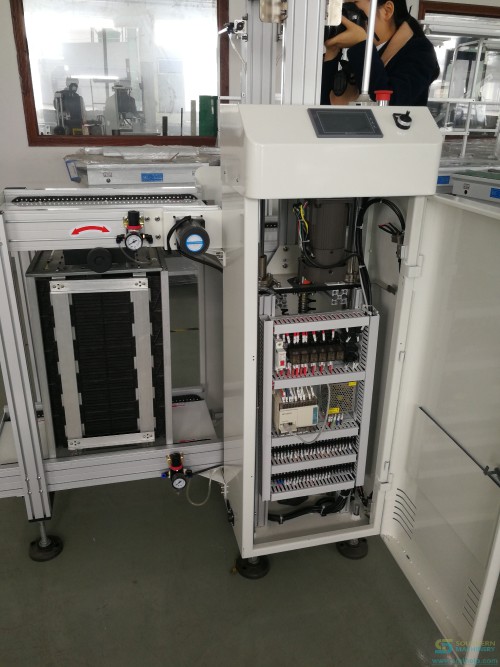
2. Frame installation of the entire machine.
3. Installed power motor
4. Install PLC control box.
5. Install sensor and belt.
6.Install the cover
7.Install the LOGO

8. Install the program and test the machine.
9 .Use PCB board to test machine.
10.Use a magazine test machine.
11. Aging operation week
12. Simple packing before shipment.
13. On the day of shipment, use the export wooden box vacuum packing,
14. Arrange forwarders to pick up the goods.
Four machines were shipped and shipped to the United States via freight forwarders.
ming@smthelp.com
PCB Unloader loader and Destacker from production to packaging.
1. Purchase all kinds of materials according to order.
2. Frame installation of the entire machine.
3. Installed power motor
4. Install PLC control box.
5. Install sensor and belt.
6.Install the cover
7.Install the LOGO
8. Install the program and test the machine.
9 .Use PCB board to test machine.
10.Use a magazine test machine.
11. Aging operation week
12. Simple packing before shipment.
13. On the day of shipment, use the export wooden box vacuum packing,
14. Arrange forwarders to pick up the goods.
Four machines were shipped and shipped to the United States via freight forwarders.
ming@smthelp.com
S-CC200 User’s Manual for Part Counter
Index
-
Introduction…………………………. … ……. ….……..3
-
Attention for part counter……… ……………………. . 4
三、Chip bonder counter function key and operating instructions… ………………………………………………. …4
四、Chip bonder counter connecting printer operating instructions (Option) ……………………………… …………6
五、Trouble Shoot……….…………………….……………….8
六、After-sale service……………………………………….9
七、After-sale service card………….……… .. …………………..10
一、Introduction
1、Theory
Chip bonder counter can precisely count the SMD quantity, by adopting optical and electric sensor theory, using the corresponding relation between guide hole on the carrier and part, and by the special die and massive integrated circuit, chip bonder counter achieve zero error, and achieve convenient, quick counting, it is an effective auxiliary equipment for managing SMT material.
2、Product features
With full automatic way figure part quantity, it is convenient to count and delivery material. Easily operate it, original design defending strip dropping off decrease strip hurt to a smallest extent. It can count in forward direction or in backward direction, and it can be preset value, precisely figure out quantity with zero error. You also can install scanner gun and barcode printer, which is more convenient for managing operation..
3、product specification
Power: AC220V,50/60HZ,25W
Counter range: -99999–99999PCS
Profile size: L470W300H180mm
Weight: 10KG
4、Product Utility
Suit for SMD strip type of part
Strip wheel diameter: suit for any size
Strip pitch: 1,2,4,8,10,12,16,24,32,44,56mm ( Note: if pitch is smaller or wider, make it according to customer’s request)
Strip width: 4,6,8,12,16,24,32,44,56mm (Note: if width is smaller or wider, make it according to customer’s request)
5、Product Structure
this product have two types.
-
S-CC200 Standard chip bonder counter

2) S-CC202 inspecting missing type chip bonder counter
1、material reflector
2、Tray
3、Gear/motive pressing plate
4、monkey wrench
5、rocket head
6、free movable shoulder
7、location knob
8、display
9、key
10、power key
11、handle
12、glass fiber amplifier
13、glass fiber head to head emitter
二、Chip bonder counter attention
1,After unpacking, please count and make sure all accessories ready.
2,Before using chip bonder counter, please carefully read operating instructions and safe keeping.
3,Please check whether voltage specification conform to the electric supply.
4,Please check grounding properly, and guarantee safety of human body and part.
三、Chip bonder counter function key and operating instructions
1、Function key introduction
1)”PRINT”
Operation way: enter the key, you can print the counting part and quantity on the barcode by the barcode printer.
2)”SET”
Operation way: if the display shows 00000 in the left bottom, you can directly press the number key to input the counting part quantity; press the SET key one more time, the machine switches to manual mode, and the display shows ***** in the left bottom. Switch to manual mode or automatic mode using this key. (note: under automatic mode, you can preset a value before counting material, when machine turn to the presetting value, it will automatically stop, under manual mode, only if you press ” stop/zero clearing” key or it finishes all material, the machine will stop.)
3)”PITCH”
Operation way: after pressing this key, the pitch value in the display will flicker, then you can input the pitch value and press “ENTER” key, if no press after 5 second, automatically memorize, the machine will resume to standby status after one ticking sound.
4)”RIGHT” “FOREWARD/RIGHT”
Operation way: Pressing this key, start clockwise counting part, the numerical value is positive number, “BACKWARD/LEFT” on the contrary.
5) “STOP/ZERO CLEARING”
Operation way:
(1)Under counting or feeding back status, press this key, it will stop counting or feeding back.
(2)If under standby status, press this key over 2 second, the counting value will be cleared up.
(3)If under printing interface, press this key, return to main interface.
6)”SELECT”, this key is switching key for setting parameters in printing interface.
7)LCD display
Set pitch
Set counting quantity part quantity
display*****under manual mode
8)”Time/missing stop” key is switching key for motor rotating speed, press this key, LCD display will show motor speed will be switched among H(high speed), M(middle speed), L(low speed).
2、 Operation Flow
1)Connect the power cable to the master machine, and plug the AC220V power.
2)Turn on the POWER key on the panel of machine, at this time, LCD panel become light
3)Press PITCH key, set the pitch between counting parts, then Press “ENTER”, and put the part on the left tray.
4)Manually pull out the strip and put it between material guard plate and counting gear, make the first part and blank middle hole aligning the middle line of material guard plate.
5)Press “STOP/ZERO CLEARING” key for 2 seconds, make the value zero clearing. Note: when pulling the strip, counting gear will turn and count, pressing this key, make the value zero clearing.
6)Press “SET” key to switch to manual mode or automatic mode, when you select automatic mode, you should input a value which you are going to count, or the “FORWARD” motor won’t start.
7)Pull strip coiling to the blank tray (right tray) by your hand, press “FOREWARD/RIGHT” to begin counting.
8)When finishing preset value, motor stop. Impacted by the inertia theory, counting number may be more one or less one than the set number,
9)When finishing counting, press “BACKWARD/LEFT”, strip will coil back to the left tray, after finishing, rotation will stop.
四、Chip bonder counter connecting printer operating instructions (Option)
1、Check equipment
1)Connect part counter and barcode master machine
2)Correctly place the barcode paper in the printer
2、 adjust and test equipment
1)Start power switch of the part counter
2)Start bar code master machine power switch: power pilot light and ready pilot light are on, at moment, press FEED key of bar code master machine (automatic aligning key), make the paper automatically align. ( P.S: if power light is flickering, it denotes the machine is off line, please restart power or repress FEED key)
3、Print
Press “PRINT” key in the master interface, master interface will display printing interface, the first row in the interface show: company name (you can set it by yourself); the second row show: time, the last row show printing operation.
-
When entering printing interface, there is a flickering cursor in the third row, you can edit and modify the content in the cursor position.
-
In the printing interface, pressing LEFT/BACKWARD, you can make the cursor move left, pressing RIGHT/FOREWARD, you can make the cursor move right.
-
In the cursor position, you can directly input the number or letter, if you continually press any key among 0~9 key in a short time, you can switch between number and letter on the key. Among of them, pressing 1 key, you can switch to special symbol, Capital letter, small letter, and etc.
-
After editing each row, cursor will stay in the row you are editing, press “ENTER” key, it will display OK in the left of this row, which means the content is saved.
Note: Saving the content in the editing row, only when cursor is in this row, and then press ENTER, the content can be saved. For example, if you want to save the content in the first row and second row, when cursor is in the first row, you press ENTER key, at the moment, only the content in the first row is saved, the content in the second row can’t be saved.
-
In the printing interface, press SELECT key into printing parameter setting interface, XYWH: XXX XXX XXX XXX showed in this interface separately denote X axis, Y axis, width, height which you can set to the printed barcode paper.
-
Press STOP/ZERO CLEARING back to master interface
-
Press PRINT key one more time, you can print the content in the printing interface.
Tag: when scanner scans barcode, it will display in the printing interface, press PRINT key to print.
五、Easy trouble shoot
| Failure | debug method |
| After turning on power, LCD no display, buzzer no sound | Please check if power cable drop off or fuse loosen |
| 。After turning on power, LCD no display, buzzer sound | LCD display cable loosens or breakdown, please check or contact dealer to change. |
|
LCD normally displays, but FOREWARD/BACKWARD can’t be started. |
|
六、After-sale service a: (overall unit maintenance period for one year, master controller board maintenance period for three years, and tended for all life.) the following state happened is not in the free maintenance condition.
-
Machine is damaged under carried by your person by himself
-
In unstable voltage region, due to not using voltage stabilizer, cause component damaged.
-
Due to not using correct voltage, cause component damaged
-
Not selled by our company, but selled by dealer or other factory.
-
Natural disaster, or act of God.
After-sale service card
User’s Name: Address:
Machine model: User’s phone number:
Purchasing Date: Dealer’s seal:
User should know that:
- From the purchasing date on, overall machine will be maintained for one year, and tended for all life.
-
The following state is not in maintenance condition:
(1)Due to wrong operating, carelessly using, natural disaster cause the machine damaged.
- Due to operating abnormally, cause the machine not work properly.
- Once dismantled or repaired by someone who is not our technician.
- Using consumable supplies or component which are not from our company, cause the machine damaged.
- Not using the voltage required by our company, cause the machine damaged.
- Due to operating abnormally, cause the machine not work properly.
- Except this guarantee, any guarantee card supplied by other company or people won’t be approved by our company.
- Please safe keeping the card and formal purchasing receipt, when repairing, it will be effective after showing them to our people review.
- If the card has no commodity seal and purchasing date, the card automatically become invalid.
Destacker Build Procedure SDM0029
Rev A
1. Obtain the proper shop packet and check order for build information. Pull all parts if any parts are missing, fill out a shortage sheet and give a copy to the appropriate material coordinator.
2. Pull the latest Electrical and Mechanical prints.
3. The following procedure is for a 29″ Destacker. Attach leg and control box to main beam. Leg should be flush to left side of main beam. Control box should be 3″ from right side of main beam. Attach width units to main beam, 4-3/8″ from either end square to main beam and Parallel to each other.
4. The following procedure is for the 44″ and 58″ Destackers Attach leg and control box to main beam. Leg 7-5/8″ from left end control box 7-5/8″ from right end. Attach width units to main beam 8.975″ from either end. Square to main beam and parallel to each other.
5. Attach rear rail to width supports parallel to main beam 3/8″ overhand from either end of main beam.
6. Level conveyor from side to side and front to back, off rear rail
7. Attach front rail to width supports. Match level to rear rail, especially front to back. Make parallel to rear rail. Make ends even with rear rail.
8. Install motors, pulleys, UHMW and belts on rails.
9. Attach Destacker assy to rails
10. Assemble valve pack assy and install
11. Attach air input assy
12. Attach front cover and wire into control box
13. Run pneumatic lines, load program software and test.
14. Complete check sheet, turn over to QC
End of Document


SC-500 PCB separator V-Cut machine
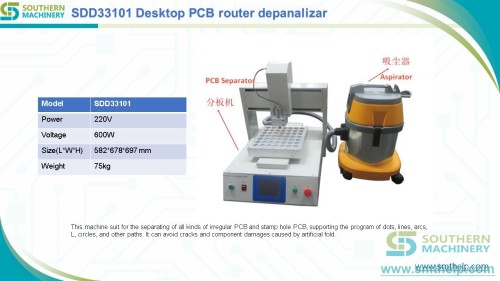
advantage:
1. To connect multiple pieces of the board after the solder, broken often damage the circuit or break the electronic components, the machine to move the knife to split, which can completely reduce the stress, to prevent solder cracking and parts cracking, improve production efficiency and quality . 2. Using the knife on the knife under the flat knife, the plate as the next flat knife, switch a step on the round knife moving to the set point of the move, about to cut off the PCB board, cut off without silk, incision formation, no flash.
Features:
1. Completely independent development, the use of microcomputer control, precision fixed point, strong stability. A knife cut off within 0-360MM long single board;
2. Cutting board cutting speed can be adjusted high, low two, speed 500mm / S and 300mm / S, fast speed, you can improve product quality, no flash, no glitches;
3 knife travel: 0-500mm (tool length can be customized). Knife round height adjustment: 0-2mm for a variety of PCB thickness to solve the problem of PCB board V-CUT slot depth. Console adjustable height: 0-50mm;
4. Traveling stroke can be set with the length of the board forward stop fixed point, stop fixed point set manually;
5. Rear baffle depth range: unlimited. Maximum plate cutting width: unlimited, maximum plate cutting length: 360mm, the maximum thickness of the plate: 0.2-5mm, the maximum thickness between the V tank: 0.25-2.0mm;
6, the next knife for the import of high-speed steel, durable extremely, when the knife adverse, you can then grinding;
7. Can be matched with additional conveyor belt, easy to cut PCB board automatically sent;
8. lifting platform platform movements, platform elevation, can affect the quality of the product, not easy to cut the product can reduce stress;
9. Limit device, you can apply different sizes of products, thereby enhancing work efficiency;
Technical data:
Power: Single-phase AC230 / 110V 50-60HZ, 40W
Machine size: L823 * 405 * 425mm
Net weight: 350Kg
Tool Material: SHD61 imported high-speed steel,
On the round knife: diameter 125mm, under the straight knife length: 500mm
SC-509
V-cut PCB Separator Machine with Moveable Cutting Blade
Features:
- To connect multiple pieces of the board after the solder, broken often damage the circuit or break the electronic components, the machine to move the knife to split, which can completely reduce the stress, to prevent solder cracking and parts cracking, improve production efficiency and quality .
-
Using the knife on the knife under the flat knife, the plate as the next flat knife, switch a step on the circular knife move to the set point of the move, the PCB will be cut off the cut, cut off without silk, incision formation, no flash
Features:
- Completely independent development, the use of microcomputer control, precision fixed point, strong stability. Cut off a single board within 0-360MM long
Cutting board cutting speed can be adjusted high, low two, the speed of 500mm / S and 300mm / S
Knife wheel path: 0-360mm. Knife round height adjustment: 0-2mm for a variety of PCB thickness to solve the problem of PCB board V-CUT slot depth. Console adjustable height: 0-50mm.
The path of travel can be set with the length of the board forward stop fixed point, stop fixed point set manually
Rear baffle depth range: unlimited. Maximum board cut-off width: Unlimited, Maximum board cut-off length: 360mm, Board maximum thickness: 0.2-5mm, Maximum slot thickness between slots: 0.25-2.0mm
Upper and lower knives for the import of high-speed steel, extremely durable, when the knife negative, can be re-ground
Can also be an additional set of conveyor belt, easy to cut the PCB automatically sent
lifting platform platform movements, the platform elevation, can affect the quality of the product, not easy to cut the product can also reduce stress
Limit device, you can apply different sizes of products, thereby enhancing work efficiency
Specifications:
Power: Single-phase AC230 / 110V 50-60HZ, 40W
Machine size: L1000 * W395 * H425mm
Packing size: L1100 * W420 * H450mm,
Conveyor belt size: L1030mm * W220mm * H130mm
Net weight: 47Kg, Package weight:
Tool Material: SKD61 imports of high-speed steel, the round knife: diameter 125mm, the next straight knife length: 360mm
Basic maintenance:
1, the work is completed, turn off the power, remove debris.
2, always pay attention to the upper and lower cutter protection.
3, a long time not working, please remove the upper and lower cutter, and coated with oil to be protected, please wipe before use.
4, pay attention to check the fastening of the screws.
Customers FAQ About PCB Separator SC-509:
- Q:Do you have any certification for this machine?
A:YES,We have CE ISO FCC ROHS etc.
Q:What is warranty of the machine?
A:1 year.
Q:How do you pack the machine?
A:We fix the machine on the plywood base with screws to ensure safe transportation.
Q:What is life time of machine blades?
A:About 6-12 months.
Q:What is material of blades?
A:Japan high speed steel SKH-9
Q:Can the blades be sharpened?
A:Yes, they could be re-sharpened for 2-3 times.
Q:How do you offer oversea service?
A:We could send engineer to do installation and training for client if needs.
Q:Can we see your machine in our country?
A:Yes, we would like to offer contact details of our clients who are using our machines.